A use case is a very useful tool that will help to organize a project. Use cases are focused in displaying how the different types of users or outer systems interact with the software. It tries to display all interactions possible; sometimes this is not optimal if the sheer number or complexity of these makes the use cases illegible or unorganized. Even if it is not optimal in large numbers, use cases can still help organize the system requirements and maybe avoiding coordination or scalability problems.
An example of a use case entry can be seen below:

The parts of a use case in this scenario are:
Pre-condition: Before starting to consider this use case, the pre-condition must be met
Post-condition: After completing this case, sometimes is good to write down what follows.
Basic path: The normal procedure of the use case, how it should be executed
Alternative path: It is a path that can also be taken within the basic path, it is written so it is put in consideration when developing the project.
Exceptional path: An alternative path that will raise errors in the software, also written here to be considered in development.
Use case Diagram
A much simplier and summarized way to display use cases is a use case diagram. It is not a replacement for the table above, but a summarizer. It displays the systems and users and how they interact with the application. The use case diagram is composed of a set of figures and connectors that will represent the above. A use case diagram can help you observe different scenarios in the interactions, goals that these interactions want to achieve and how complex is the software.
Below there is an example of a use case diagram:
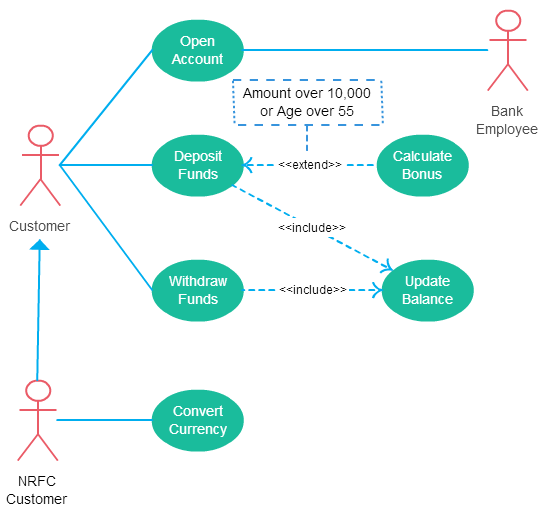
As seen in the figure, use case diagrams have the following elements:
- Actors: Normally presented in stick figures, they represent the users, systems or organizations that interact with the software.
- System or Scenario: A specific sequence of actions and interactions between actors and the system. A system may also be referred to as a scenario.
- Use cases: The ovals present in the figure, they represent the different use cases that a user has.
- Associations: A line between actors and use cases. Some lines have the <<include>> or the <<extend >> keywords. The first one signifying that after a use case is computed, the other one follows. The latter one meaning that after the use case is computed, the other one could follow, but not necessarily.
Use cases are a really useful and fine tool in software development, and work specially good when the software has complex or too much interactions with different actors
 Good Code Practices