PHARO: SMALLTALK

Updated: 11/11/2019

This partial we started learning the language Smalltalk through Pharo virtual machine.

One thing to understand about Smalltalk and pharo is that everything inside this virtual machine is an object, even simple numbers. Every object has its attributes and methods, Pharo already comes with lots of packages to start exploring, which can be opened in the system browser

There are 3 main windows pharo provides in order to meddle with the program:

Transcript window: This window is used as an output source for every print that is included in methods

Playground window: This window is used to access the different objects pharo has available and meddle with them. In summary this is, as it name suggests a playground for testing.

System browser window: This window is used to create, modify or classify the objects and methods present in the virtual machine.

Creating a new class:

                To create a new object class we need to go into the system browser and select a package (or preferably create a new one).  Here in the lower part of the window a template of a new class will show.

Create a class using the system browser

As seen in the picture above, we see the template of a class which will derivate from the Object class. Where the subclass is originated from can be changed, but for now it will remain like that.

The name is declared in the #NameOFSubclass, it is important to leave the # with the name.

The class can have instance variables which will change of value for each object created from this class, just like any other object oriented language. They are declared inside the ‘ ’ part separated with spaces.

The class can also have class variables which won’t change individually for each object created, instead these values will stick to the class statically and all objects created will share them. They are declared the same as the above.

For the package part, Pharo will be kind enough to be in charge of organizing classes, the package will be set automatically when a template appears, if you want to put other package rather than the current one, just replace the name and it will work. At the end the class should appear more or less like this:

Example of a class

To create the class you just save it (ctrl+S).

After these steps an error should appear saying something about not being a comment with the class. You can safely ignore this error, or if you prefer you can set a comment by clicking in the class name in the upper part of the window, a comment tab will appear where you can edit its contents.

Creating a method:

To create a new method you select the class you want in the upper side of the window, in the upper center then it should appear something called “instance side” or something else depending in your reference object. This part of the window is in charge of organizing the methods you create or override (because it is a subclass, you will have to override some methods like the initialize method).

If you click in the “instance side” text, a template in the lower part of the window should appear, this time it is the template to create a method.

Pharo tends to be very organized about its classes and methods, which is why the column in the middle (where “instance side” is) exists.  This column is in charge of classifying methods, is your method a getter? Is it a setter? A constructor or some weird method you don’t know how to classify? You will surely want to classify them in this column. Of course this is Pharo’s  ways to make it easier for us to understand our code, but it doesn’t mean you need to do it. You can ignore this column completely if you wish.

The messageSelectorAndArguments is a bit tricky part. It is the name of your method, but you can also declare a parameter with the method, like this:

method name without parameters
method name with a parameter, the : is important

Like most of programming languages, smalltalk lets you put an unlimited number of parameters, but how to put them is a bit tricky. As we know you declare a parameter by naming it and putting it next to the method name, but Smalltalk actually forces you to add an extra ”specifying” one-worded name just before the next parameter, this is made so that when you call the method in the playground you actually know where and in which order the parameters go.

A method with more than 1 parameter is declared like this:

method name with various parameters

These parameters, as expected, work like the parameters of any other common programming language, they are variables.

Commenting in your methods is really important to Pharo, hence why is it automatically writing a comment saying  “comment stating purpose of message”. This is, as you probably guessed, completely optional.

Declaring temporary variable names is done at the very start of the method, it is declared as seen above, with the  “||” characters, you can create as many variables as you wish, separated by a spacebar.

After the variables are declared, it’s time to actually write what your method will do, manipulating variables, parameters or attributes of the object.

The return statement is declared by the “^” character followed by the stuff you want to return. If you want to return multiple variables or as per usual, multiple strings, you could concatenate some objects separating them with a comma.

To access an attribute there is no fancy word like “this.”, you just write the name of the attribute and it will automatically detect it. This should be problematic if you have a local variable named the same as an attribute but in reality it isn’t. Smalltalk will be smart and will mark as an error when a local variable has the same name as an attribute.

Sample class with “hello” as an attribute
At the moment of saving, this appears

With the information above, we can now create a method, something like this:

Sample method with 2 arguments, 3 local variables and a return state

Our new created class will be in effect in the Playground window:

Playground window

This window will be used to meddle and “play” with all the objects available.  Create multiple objects, assign them values etc.

If you tinker with some of the available classes you can create useful software that has a GUI or maybe some data structures.

Sample method of sample class

In order to execute a method from an object, like all object oriented programming, it is needed to create the object first, then asign it to a variable and then call the method as shown below.

sample method running in the playground

One thing to know about Smalltalk is that to create a new instance of something, it is needed to specify the object first and then the “new” method.

The new method can actually be overriden for that specific class (since its a subclass) so we can initiate our instance or class attributes. The method needed to be overriden is called “initialize”. With this we can now ask for parameters at the initialization of the object.

With this you now may be able to play around Pharo and learned the basic stuff in this updated guide, at least for the year 2019.

Design patterns

Design patterns are common approaches to common problems that can be found when creating software; they are created for the purpose of solving problems which were solved before, so we can speed up implementation process. They are a sort of general manual a developer can follow in order to implement a solution to a specific problem or requirement in their code. Usually, design patterns describe the problem that they solve, describe the thought solution and how does it work and its consequences. It is up to the developer to implement the solution to its desired programming language, but often design patterns also come with examples and implementation hints.

Why are they good

Design patterns help speed up the development process. They provide a tested and proven solution to a problem which has been already solved in the past, meaning we don’t need to re-invent the wheel every time. Design patterns save us a lot of time in debugging code because they consider issues or bugs that often won’t pop up until later in development, which may happen with fresh code not following a design pattern. Also they add readability for someone who also is familiar with them.

There are three main types of design patterns:

Creational design pattern
these design patterns manage class instantiation or object creation. These patterns are divided into Class-creational patterns and object-creational patterns. Class-creational patterns use inheritance in the instantiation process; object-creational patterns use delegation instead.

Structural
these design patterns organize different classes and objects to form larger structures and provide new functionality. They can be used for scalability and of course organization.

Behavioral
Behavioral patterns identify common communication patterns between objects and realize these patterns. These are used to modify or add some behavior to existing or new objects and often pay attention to inputs and outputs.

Resultado de imagen para all design patterns

Anti-design patterns

Anti-design patterns are certain patterns in software development that are considered bad programming practices and are not wanted or are avoided through the development of software. They are considered anti patterns because they generate negative consequences within the software, these tend to be things like adding unnecessary complexity, approaching dull solutions that might need to be rewritten later or simply making the code unreadable (Creating spaghetti code). And so developers should avoid using anti patterns as often as they can.

An example of an anti-design pattern is a well-known anti pattern named God Object.

A god object is an object that does too much for its own good. This object has been given too much functionality and too many functions so that it becomes illegible or too complex for human understanding. This is then a bad practice which is common to see in software development, hence, it is an anti-design pattern.

Visual Example of a god object in an object diagram

A common programming counterpart, which is a good practice, is to separate a large problem into several small problems and solve them individually. This is called divide and conquer. And so we should try and avoid the god object pattern by exerting the divide and conquer tactic.

Here are some of the existing anti-patterns which would be wise to read and familiarize ourselves with them in order to avoid them.

For more information about these anti-patterns (why are they bad and how to avoid them) you can enter the link embeded in each of them.

Modeling Languages and tools

Modeling languages are tools that will help us picture things that could be too complex to comprehend or to represent whit no visual aid. We can use these tools to break down a complex problem or project into understandable parts in which we can focus on.

Modelling Languages are computer languages that very often provide graphical aid; they obey their own rules and have some sort of organized system that will define the steps to picture something by their rules.

Modelling languages have 4 main categories:

  • System modeling language
  • Object modeling languages
  • Virtual reality modeling language
  • Data modeling language

System Modeling Language (SYSML):

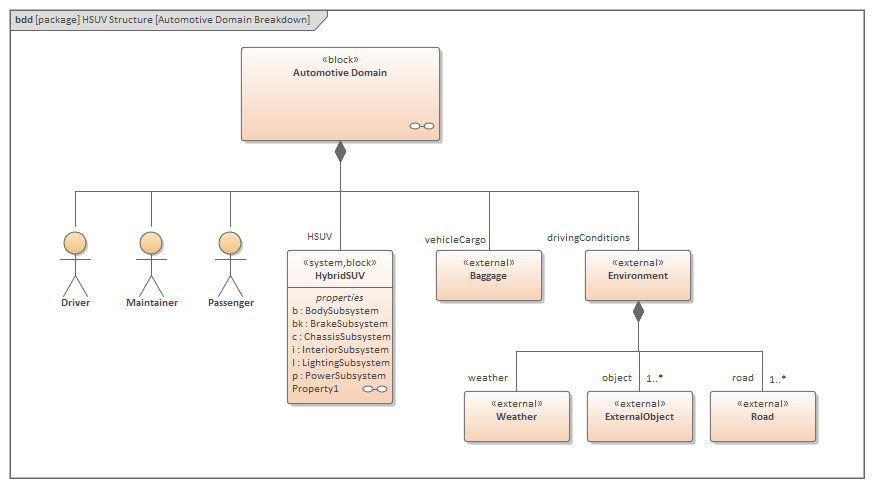
System modeling language is a language that focuses in decomposing of objects, it breaks them down to see what components make the object, this will be made with each of the resulting components too until we reach a desired level of atomization. The relationships that that the entities will have with one another will be visible by lines connecting them, they will be all joining and pointing to the “father” object to show that they are components of that object. Some objects will also be able to do things, so it is shown as subsystems of the object as seen in the example below.

Model of a car with their passangers, the diamond in the lines point to the father

Object modeling language:

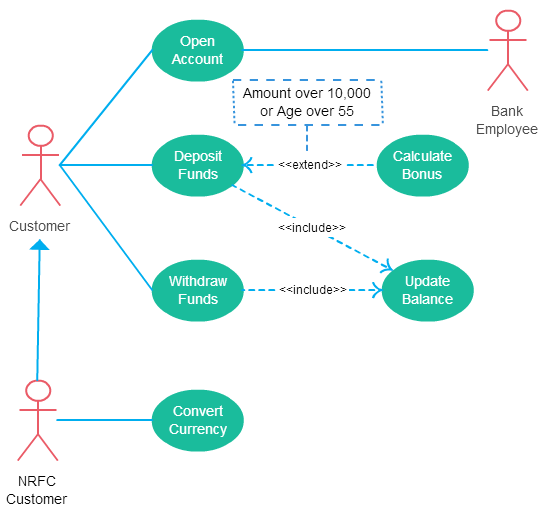
This language focuses more on the relationships between objects than their components; yes it also breaks down the main program into parts, but these parts will now have attributes and functionalities that affect only them. This language determines what relationship an object has with another object, will it interact with it or will the first object create a bunch of other objects? This language will provide types of relationships with objects such as the method of interaction, the number of certain objects involved in the interaction and extra variables present etc. Object modeling language actually evolved and turned into what we know today as one of the most popular language: UML (unified modeling language).

UML model of a bank system, the numbers represent how many of that object can interact with another, asterisk meaning ininite

Virtual Reality Modeling language (VRML):

This language is as its name suggests, more focused into three dimensional designs. This language is very different from the other languages because it actually needs you to create a texture or 3d object in order to visualize something. It is majorly used to view buildings, landscapes, textures etc. and its composition is very similar to HTML. This means that for software development, unless you really like 3D, you may not want this modeling language to start up a project, in the other hand if you are an architect or videogame developer, this could be the tool for you.

model of a street in a software called Superscape VRT

Data modeling language:

This language is similar to the object modeling language, but this time the language can actually be defined with just text, it can also be created visually as the example below, but the main advantage is that it can be understood without visual aid, making it easy to process. It is separated into entities and sub-entities where the cropped lines mean optional sub-entities, the bolded lines mean a parent-child relationship and the normal lines mean just an attribute of the entity. We can see an example below

Because of the nature of data modeling language, we can turn this drawing into the following text

The different kinds of modelling languages offer a good variety of methods to picture a problematic or complicated system, each one with its own advantages and flaws. Recently however the UML (unified modelling language) has become the most famous one of them all, at least for tackling software development problems. I personally find UML to be the most complete and well-rounded modelling language, it can be used in a lot of problems because of its versatility; of course if the problem pictured with another modelling language becomes simpler it would be best to use that instead of UML.  

Use Cases

A use case is a very useful tool that will help to organize a project. Use cases are focused in displaying how the different types of users or outer systems interact with the software. It tries to display all interactions possible; sometimes this is not optimal if the sheer number or complexity of these makes the use cases illegible or unorganized. Even if it is not optimal in large numbers, use cases can still help organize the system requirements and maybe avoiding coordination or scalability problems.

An example of a use case entry can be seen below:

Resultado de imagen para use cases table

 The parts of a use case in this scenario are:

Pre-condition: Before starting to consider this use case, the pre-condition must be met

Post-condition: After completing this case, sometimes is good to write down what follows.

Basic path: The normal procedure of the use case, how it should be executed

Alternative path: It is a path that can also be taken within the basic path, it is written so it is put in consideration when developing the project.

Exceptional path: An alternative path that will raise errors in the software, also written here to be considered in development.

Use case Diagram

A much simplier and summarized way to display use cases is a use case diagram. It is not a replacement for the table above, but a summarizer. It displays the systems and users and  how they interact with the application. The use case diagram is composed of a set of figures and connectors that will represent the above. A use case diagram can help you observe different scenarios in the interactions, goals that these interactions want to achieve and how complex is the software.

Below there is an example of a use case diagram:

Resultado de imagen para use cases

As seen in the figure, use case diagrams have the following elements:

  • Actors: Normally presented in stick figures, they represent the users, systems or organizations that interact with the software.
  • System or Scenario: A specific sequence of actions and interactions between actors and the system. A system may also be referred to as a scenario.
  • Use cases: The ovals present in the figure, they represent the different use cases that a user has.
  • Associations: A line between actors and use cases. Some lines have the <<include>> or the <<extend >> keywords. The first one signifying that after a use case is computed, the other one follows. The latter one meaning that after the use case is computed, the other one could follow, but not necessarily.

Use cases are a really useful and fine tool in software development, and work specially good when the software has complex or too much interactions with different actors

Unified Software Process

It is a software development process that can be differentiated from others with three main characteristics that compose it: Use-case driven, architecture centric and iterative and incremental.

Use-case driven:

 It means the software process revolves around use cases. These will actually define how the program will work, what will be its functionalities and limitations. Use-case driven means use cases are also responsible for the method of implementation, testing and design. 

Architecture centric:

The software architecture defines how the functionalities of the program interact or integrate with each other. This means the architecture of the software has influence on how use cases are integrated into the software.

Iterative and incremental:

This means that the software will be developed through a series of versions of it. It is thought to “evolve” into the final product as a whole instead of building each part fully and separately. This part can be divided into 5 phases: Requirement gathering, Analysis, Designing, Implementation and finally testing. These phases will repeat themselves in a loop, these loops are called iterations.

Unified Software process is separated into 2 main types: Open Unified Process and Rational Unified Process which actually divide into 4 phases, similar to the 5 phases we saw before.

  1. Inception – The idea for the project is stated. The development team determines what resources will be needed.
  2. Elaboration – The project’s architecture and required resources are evaluated.
  3. Construction – The project is developed and completed. The software is designed, written, and tested.
  4. Transition – The software is released to the public.

These processes are helpful to effectively plan ahead with intervals. The diference between the two is Open unified process is more focused in planning ahead and giving oversight, so that decisions can be taken before a mistake is made, promoting a fast pace development,  and Rational unified process focuses on optimization of resources, trying to waste as little as possible and make the best program that can be made.

Which one is better:

Personally I find both processes very similar, following the same phases and dividing themselves in iterations. The difference between the 2 of them is not so big; the only thing it changes is the focus of the software treatment. Do you want to be fast and steady? Or do you want to have the best version of your software? In reality, a team of developers could mix or intercalate between the two of them to adapt to the environment and thus trying to create the desired product.

Software Life Cycles

Life cycles in software developement

Life cycles in software developement help us understand the general concept of how a software is (or should be) created, these processes of software development were created to facilitate its implementation based on requirements given or thought at the very start.

Currently there are many types of software life cycle, although they have similar phases, these are sorted in different order and some may repeat, this variety is made not because one cycle is better than the other, but to have a variety of options when it comes to creating a program, because not all of them will be able to accommodate with just one type of life cycle.

Lyfe Cycle Models:

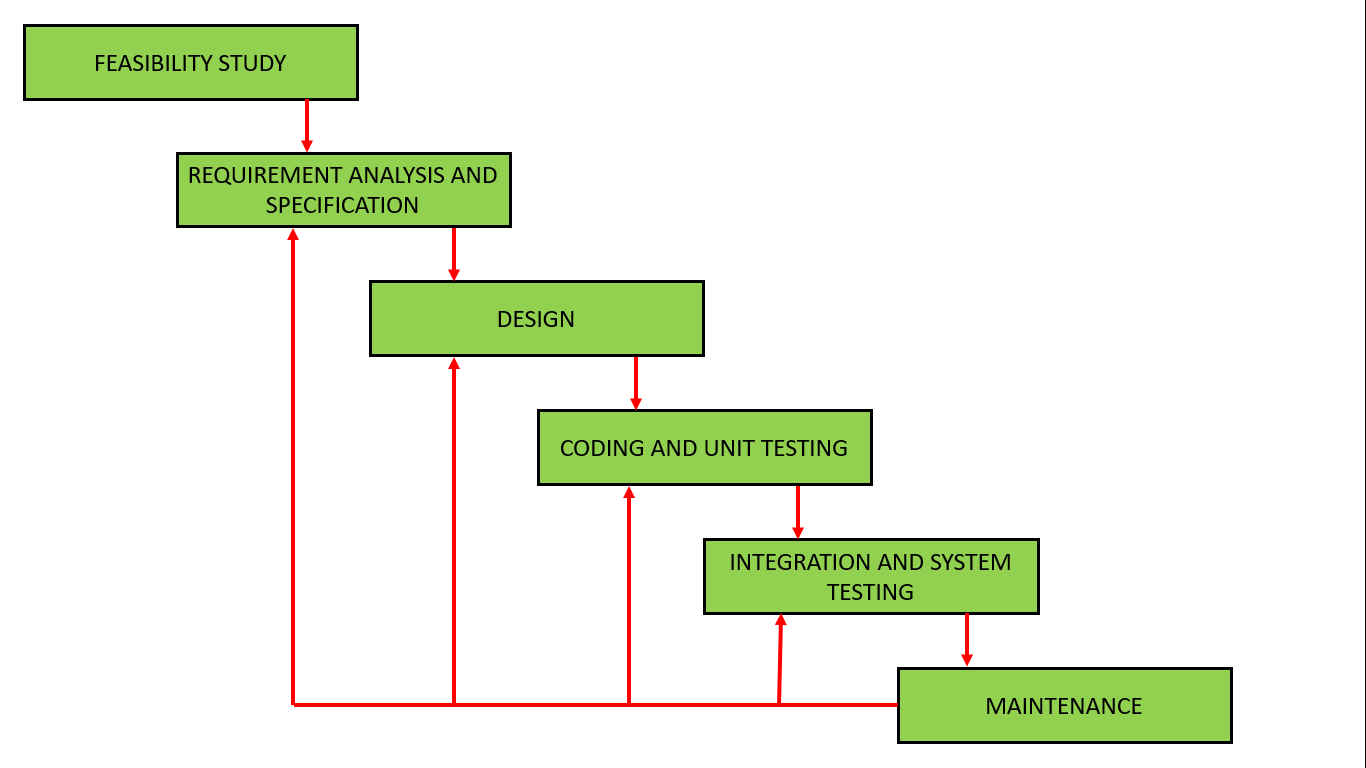
Waterfall model

Waterfall model is a linear type of model. It is used mainly in software where it cannot afford major changes during testing or changing its focus. The name is given because the phases shown cascade one after the other, separating entirely one phase with the other. This model is pretty straight-forward but not flexible, which can be a huge disadvantage to some projects.

Prototyping model

Prototyping model concentrates in making prototypes, as its name suggests. These prototypes are not a complete version of the final software; instead they focus on prototyping a specific part of it, one by one, and so the complete version of the software will eventually be made. This model is good to receive a lot of feedback, since you can have something to show to the client. The downside is that the time invested in making the prototype is significantly larger than other models.

Spiral method model

The spiral model is more of a combination between prototyping and waterfall models. It works by executing the waterfall model but in a smaller scale, just for one part of the software, this is so at the end of the cycle you have time to observe for improvements, make simulations and determine the next plan of action. This process will be repeated a multiple number of times until the software is completed. This model is preferred when creating a large or complicated project.

Iterative

Iterative model is basically a waterfall model but it’s trying to remove the biggest flaw present on it. This model tries to overlap the waterfall model’s phases, this giving opportunity to correct stuff from the previous phase while working on the current one.  Also, the model tries to do the overlapping waterfall model multiple times, just like spiral model. The difference is that testing is not as deep as the spiral model. You want to use this model when you want to present quick results to the client, and problems within the project are detected easier.

Agile development model

Agile model is created to try and adapt quickly to major changes in requirements. As its name suggests, agile model tries to get the best version of the software while trying to be the quickest. Agile model decomposes requirements into really small parts and developing around them. This gives the advantage to get feedback from the user really quickly, and opens the opportunity for a lot of flexibility.

Design a site like this with WordPress.com
Get started