This partial I learned a lot about project managing and personal growth. There is more to being a developer than just knowing how to write code.
In the partial, our teacher Ken lets us have a flexible schedule when it comes to deadlines, and the class focuses more on talking / discussing about a topic than to just read about it or having the professor to explain everything at his own pace risking some students to fall behind. I think that this flexibility and discussion classes are pretty useful for everyone, it permits learning the content of the course at each student’s own pace, and because of this flexibility we as students can focus on other projects and still have time to focus and actually learn about the course topics in the given time.
Throughout this time period we learned about 4 different topics, and in the end, implement them in a real life project simulation, which is our class project. These are the topics viewed:
Software life cycles:

Software life cycles are kind of like plans to help the development of a project; each life cycle specializes in some aspect of the development or takes it with different approaches. They may not seem really important in small projects, but it is almost imperative to have in bigger ones, mostly because it is really easy to get lost when continuing throughout development, adding and scrapping ideas, a change of plans, or some sort of unseen error. Without one, it becomes more likely to forget or bypass crucial information previously stated or to just not managing time in order to finish a project.
Software life cycles are more about time and resource management and they are a difference between a meh result and an outstanding result.
Unified software processes:
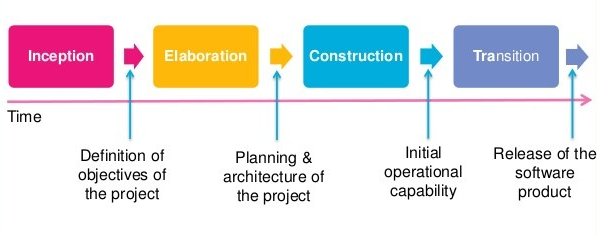
This “Unified software process” is like a form of planning a software development ahead based on the user’s expectations. Following this process will lead to the act of determining how will the software will be built, what resources will be needed in order to satisfy the end users.
The process divides itself in some steps: firstly takes in account feedback or expectations from stakeholders or people involved in the software, forming requirements for the end product. Then a software plan is made so it satisfies the previous requirements. The software then is built and finally it is given feedback.
The process is iterative and incremental; meaning the previous series of steps can be performed as much as we want in order to make the best software possible.
Use cases:

In my experience, use cases will be present a lot in software development. There has been around 5 projects I’ve done in the last year. All of them contained use cases, or use case diagram.
A use case is a really helpful tool that will help us organize the different kinds of interactions the software will have with different users, other components or with the admins. We create a use case for someone when we want for that someone or something to interact with our software. It is basically a list of things that we need to take in account when starting development stages.
From these use cases we can create something perhaps more useful for the human eye instead of a list, we can create a use case diagram.

These diagrams in my experience with projects are extremely useful when planning how some software will behave and when creating other diagrams like a class diagram. With these we can easily know who or what will want to interact with the program.
Modeling Languages and Tools:

Modeling languages will actually help us understand or picture relationships, classes and interactions of a software that would otherwise be a little too complex to remember or to put in a list. This models are a visual aid for developers or well, people involved in the project. A very good example of a modeling language is UML which is really useful for developers in my experience. Modeling languages, like any other language, have their own set of rules and context, and thus many modeling languages exist.
Some of the main examples of this are:
- System modeling language
- Object modeling languages
- Virtual reality modeling language
- Data modeling language
Some of these topics may look similar to each other, but each one has their own differences and serve different purposes.
Pharo resume
Throughout the course, the class has this “side quest” which we can complete only for personal growth purposes. The task that was given has to do with auto-learning. We were tasked to learn a new programming language called Smalltalk, this is because it is designed to be purely object-oriented. Inside Smalltalk everything created will be an object, from self-created classes to just plain numbers. Learning about this language will help us understand or work out our thinking focused on object oriented programming. It was difficult at first because although the Virtual machine we use to program in this language (Pharo) comes with a tutorial explaining data types, how methods and classes work, parameters etc., it still didn’t explain things that much clearly or completely, this wouldn’t be a problem since we have the almighty internet guides, but very often it will encounter outdated information which doesn’t work anymore.
Once I got the hand of it, I started to recreate some of my past projects orr programming excersices in this language as practice, it was very useful to star knowing about pharo and smalltalk. It forces yu to think differently.
Below I leave a link which has some knowledge I gathered by working with Smalltalk.
https://goodpractices.home.blog/2019/11/11/pharo-smalltalk/
Project:
Currently I am doing a software development project simulation alongside some classmates. This simulation is focused on learning how a real project would look like. We will need to, at some point, implement the knowledge found in the other blog posts.
Our project is about implementing a solution to parking in our campus, since our school has this problem that the students often arrive late to class because they didn’t find a parking spot in time; normally a student spends from 5 to 15 minutes searching for an available parking spot at times were the parking lot is full. Our solution is to put sensors around the school, which send a signal to some server to know which spots are available or which ones are occupied. You can see this technology already around malls or companies. It is often composed of a sensor accompanied with a LED which can be green, red or blue, blue signifying a spot for disabled people. The sensor would look something like this:
We are planning not only for the sensor to have a LED to show its availability, but to send a signal to some server or mini-cluster of signals to be able to access the information via soma application.
The first Stage:
For this stage we just defined who our stakeholders would be, and describe how will they influence the project.
This includes users, administrators, security, marketing and finance.
Then we try and make use cases for all the stakeholders who interact with the application or sensors in some way. For example a use case for the user to be able to observe the parking spots on the application. These use cases we defined are not final and can change through the 2 remaining stages.
Also, these 3 stages are not taking in count the development sage or final testing stage, since it’s a simulation of a project, then we will just focus on the planning and coordination of the project. Then, when the semester finishes, perhaps the project could continue its development if the stakeholders would like for it to proceed.
For the time I’ve been in this class I understood that a developer doesn’t just sit in a chair inside a room and writes code all day. It is not just receiving a request and immediately jump to your computer to start coding. Like most projects in life, software development consists of planning, executing, and getting feedback.

